So what actually is a shader?
In CG graphics, a shader is a program which runs on the GPU and determines how a 3D object will appear on the screen. For example, a simple shader may be used to render a 3D sphere in bright red color. On the other hand, an advanced shader may perform complex lighting calculations with normal maps and transparency inputs and output a more complicated image on your screen. Shaders are also not just limited to "shading" of 3D objects. They can be used for post-processing images (or render frames) in real-time or for creating visual effects.

An example of a simple (left) vs a complex(ish) (right) shader. While the simple shader on the left produces a red sphere, the sphere on the right has transparency, surface bumps as well as transparent shadows.
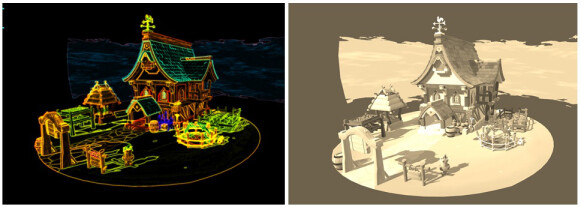
This Unity scene uses post processing shaders to create Neon and Sepia effects.
(3D artwork based on artwork by Dune Lee)
Traditionally shaders for games have been written in popular shading languages such as HLSL (High Level Shading Language), GLSL (OpenGL Shading Language) or Cg (by Nvidia). The variety in output devices coupled with differences in supported instruction sets meant that the game developers had to write shader code specific to each platform. This was indeed tedious and prone to errors! With it's own declarative shading language called ShaderLab, Unity helped mitigate this problem to a large extent. In ShaderLab, the actual shader code is still written in HLSL/Cg with Unity specific API commands and code structure. However, Unity parses this code into actual shader code for each target platform that a user wants to support. This makes authoring and debugging of shaders easy and less prone to errors.
Why do we have to write custom Shaders? Doesn't Unity already ship with them?
Yes, Unity does ship with many inbuilt shaders which are optimised and cover a lot of use-cases. However, if you are building your own application you may often run into scenarios where an inbuilt Unity shader might not cut it. Say you want to achieve an anime cell look for your game. As Unity doesn't come with an inbuilt cell shader, you will have to write one for yourself. Or you may want to write a water shader where you can set it's color and adjust it's speed. Since Unity doesn't ship with a water shader either, you may again have to write one by yourself. The list is endless but I hope you get the point. Learning to write your own shaders is a necessary skill in game development and there are dedicated roles for this job in game studios. I would go further and say that the Unity's built-in shaders should only be used for the most trivial of cases where putting an effort into a custom shader may not be worth it. If you have the skills and budget, go ahead and write your own shaders. You may end up with a shader that is better optimised for your use-case than Unity's default solution!

A custom water shader in Unity.
Ok! But now that we have Shader Graph in Unity, do I still need to learn HLSL/Cg ?
Unity 2018.1 introduced Shader Graph, Unity's own node based shader editor. Previously, Unity also supported node-based shader authoring with extensions such as Amplify for Unity. Node based editors make authoring shaders easy and almost all 3D applications such as 3DS Max, Maya or Blender and game engines like Unreal Engine support them. Although intuitive and easy to use, node-based editors are not a complete replacement for traditional shader authoring with HLSL or Cg. It is necessary for a user to know what is happening behind the scenes to write optimal shader code. Alas, your shader is only as good as your understanding of the principles behind it, so it is important to spend time learning about basics of shaders first.
So where do I start?
Learning to write your own shaders can be difficult, especially if you are just starting out and want to improve your art by writing your own shaders. As you proceed in your learning , you might notice that a lot of information available on the internet is either too vague or just doesn't fit your specific use-case. I believe the best approach to learning shaders is by writing them, focusing on one simple concept at a time, hence I decided to start this blog! I am by no means an expert in writing shaders myself, but I felt there was a need to present information about shaders in a way that was not intimidating to beginners. Through this blog, I will try to introduce the basics of writing shaders in Unity with small programs that illustrate a simple concept at a time and move on to more complex areas gradually. A complex shader can be made by combining many simple concepts in a logical way, so it will serve you well to master the fundamental concepts first. To begin with, let's discuss the various types of shaders availabe in Unity.
There are broadly three types of shaders in Unity:
1. Surface shaders
2. Vertex and fragment shaders
3. Fixed function shaders
Surface shaders:
As the name suggests, surface shaders are used to define how your 3D object will interact with lighting in you scene. For example, you may write a surface shader to render a 3D object realistically or modify the underlying lighting algorithm to give it a more cartoonish look. When you write a surface shader Unity generates a lot of code for you so you don't have to worry about handling those things by yourself. As a beginner, while this may be helpful, it can also be confusing to see your shader do something that you didn't ask it to do. Use surface shaders when you want to give your 3D objects a certain look or want to tweak the behaviour of default Unity shaders. However, if you want to do post-processing effects such as bloom, blur or edge detection in your games, surface shaders may be not the right choice since a lot of code generated by Unity for surface shaders may not be useful for post-processing. In such cases, use vertex and fragment shaders instead.
Vertex and fragment shaders:
Vertex and fragment shaders are the most basic shaders in Unity. They correspond to the vertex processing and pixel processing stages in a GPU pipeline (More on that in another blog post) . Even the surface shaders are ultimately converted to vertex and fragment shaders underneath by Unity. These shaders usually do not interact with lighting in your scene, although they can be made to do so. These shaders are mainly used to write post processing effects for your application. If you do however use vertex and fragment shaders for lighting in your scene, Unity will not generate code like it does for Surface shaders. So you would have to handle things like shadows, reflections, bump mapping and so on by yourself.
Fixed function shaders:
Fixed function shaders are basically legacy shaders and should be replaced with vertex and fragment shaders wherever possible. I would not be covering them in my blog posts but it is worth to be aware of their existence.
So, this was a very brief introduction to shaders in Unity. In my next blog post, we will learn how to write surface, vertex and fragment shaders from scratch and get accustomed to the Shaderlab syntax in Unity . Until next time!